


1.使用酷狗极速版
下载你需要的歌曲,什么品质都可以。(记得看广告获取概念版会员)
2.将得到歌曲copy到一个文件夹下
可以把手机通过USB给电脑传输文件,本地歌曲保存在如下文件夹
此电脑\Redmi Turbo 3\内部存储设备\Download\KuGouLite\Music把手机上的歌曲随便保存在电脑上创建的一个新文件夹下(里面不要有其他东西)
3.创建一个python程序
这个程序实现对酷狗下载文件尾缀的更改,更改后就可以在特殊的网站上转换成mp3格式
import os
import requests

def upload_and_convert(file_path):
    """上传文件到网站并下载转换后的文件"""
    url = "https://audio-convertor.com/upload"  # 替换为实际的上传接口
    download_url = "https://audio-convertor.com/download"  # 替换为实际的下载接口

    try:
        # 上传文件
        with open(file_path, 'rb') as f:
            files = {'file': (os.path.basename(file_path), f)}
            print(f"正在上传 {file_path} 到转换网站...")
            response = requests.post(url, files=files)
            response.raise_for_status()

        # 假设返回的 JSON 包含下载链接
        result = response.json()
        if 'download_link' not in result:
            print("未找到下载链接,转换失败。")
            return

        download_link = result['download_link']
        print(f"转换成功,正在下载文件:{download_link}")

        # 下载文件
        download_response = requests.get(download_link, stream=True)
        download_response.raise_for_status()

        # 保存文件
        output_file = os.path.splitext(file_path)[0] + ".mp3"
        with open(output_file, 'wb') as out:
            for chunk in download_response.iter_content(chunk_size=8192):
                out.write(chunk)

        print(f"文件已下载并保存为:{output_file}")
    except Exception as e:
        print(f"处理 {file_path} 时出错:{str(e)}")

def preview_remove_kgm_flac_suffix():
    current_dir = os.getcwd()
    changes = []

    for filename in os.listdir(current_dir):
        if os.path.isfile(filename) and (filename.endswith('.kgm.flac') or filename.endswith('.kgm')):
            # 根据文件后缀决定要删除的字符数
            chars_to_remove = 5 if filename.endswith('.flac') else 4
            new_filename = filename[:-chars_to_remove]

            # 删除文件名中的_SQ
            if '_SQ' in new_filename:
                new_filename = new_filename.replace('_SQ', '')

            if not os.path.exists(new_filename):
                changes.append((filename, new_filename))
            else:
                print(f'Conflict: "{filename}" -> "{new_filename}" (target exists)')

    if changes:
        print("\nPreview of changes:")
        for old, new in changes:
            print(f'  {old} -> {new}')

        confirm = input("\nProceed with renaming? (y/n): ")
        if confirm.lower() == 'y':
            for old, new in changes:
                os.rename(old, new)
                print(f'Renamed: {old} -> {new}')
            print("Operation completed!")
        else:
            print("Operation cancelled.")
    else:
        print("No files to rename.")

if __name__ == '__main__':
    folder_path = input("Enter the folder path containing audio files: ")
    # 先处理文件名
    preview_remove_kgm_flac_suffix()

    # 上传并转换文件
    for filename in os.listdir(folder_path):
        file_path = os.path.join(folder_path, filename)
        if os.path.isfile(file_path) and filename.endswith('.kgm'):
            upload_and_convert(file_path)
4.命令行操作
在新文件夹内打开命令行,有如下操作
python .\remove_flac.py

Enter the folder path containing audio files:<回车键>

Proceed with renaming? (y/n):y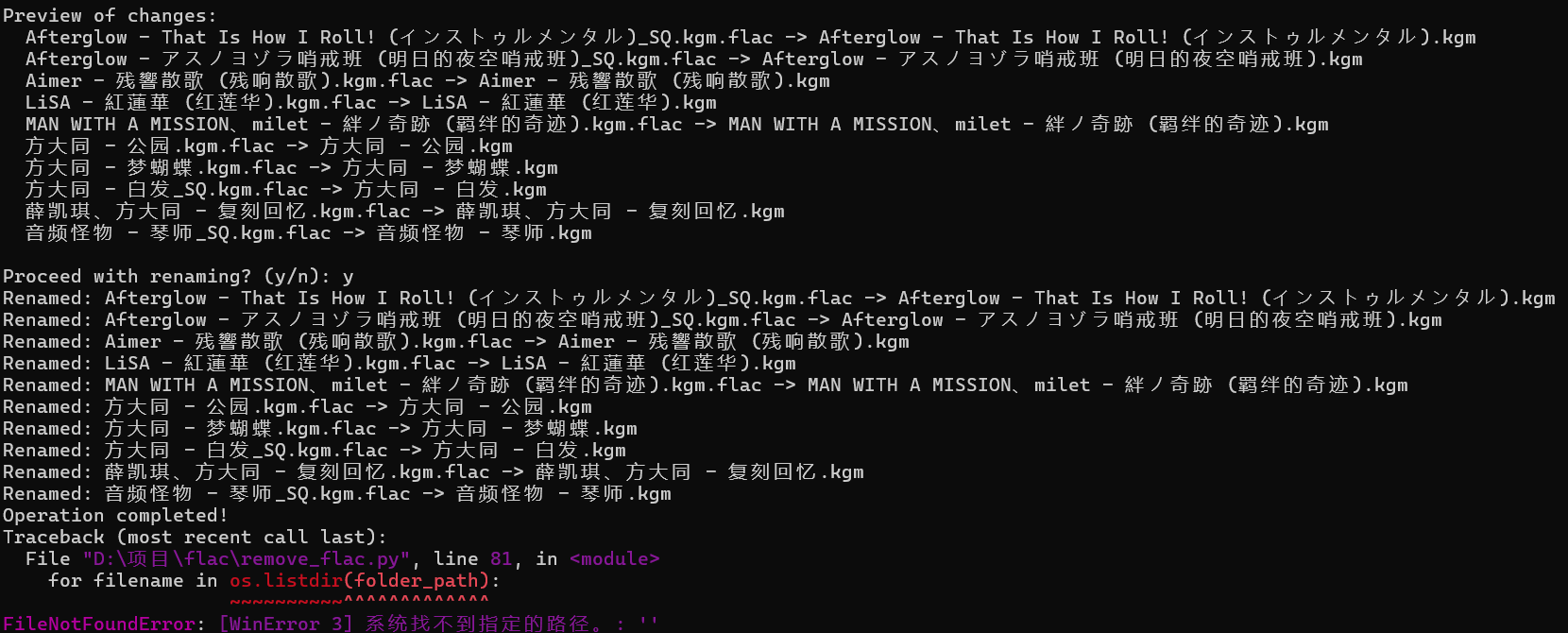
5.网站转换
把更改后的歌曲,导入这个网站:
音频格式转换器 - 免费在线批量音频转换,极速高效免上传
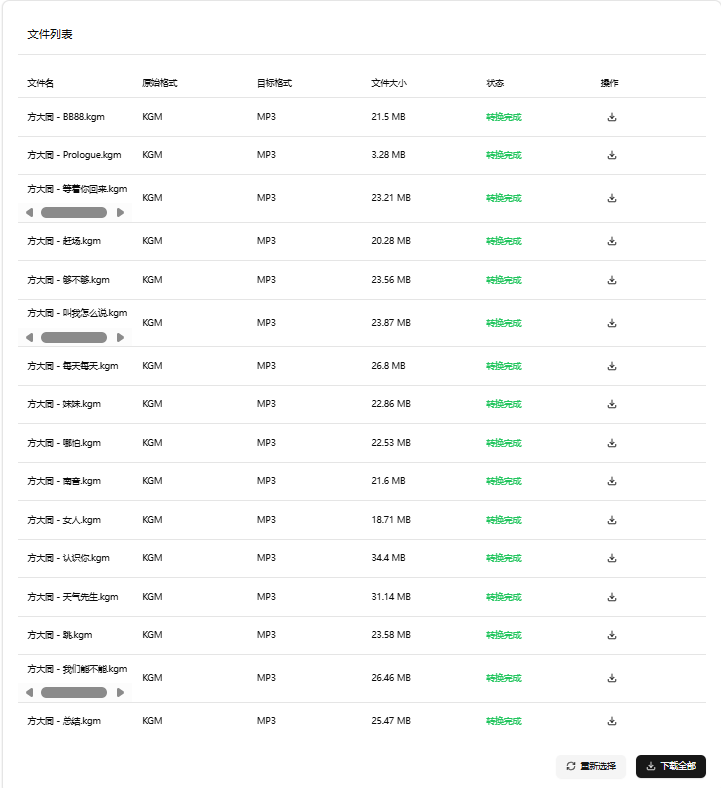
就可以转换成mp3格式了
歌曲刮削
可以使用软件Music Tag Web,对选择歌曲使用自动刮削的宽松模式(宽松模式的效果一般比其他模式要更好)